
September 18, 2026 · Michael Lynn
I Built a Teleprompter Because My Screen Share Kept Showing My Notes
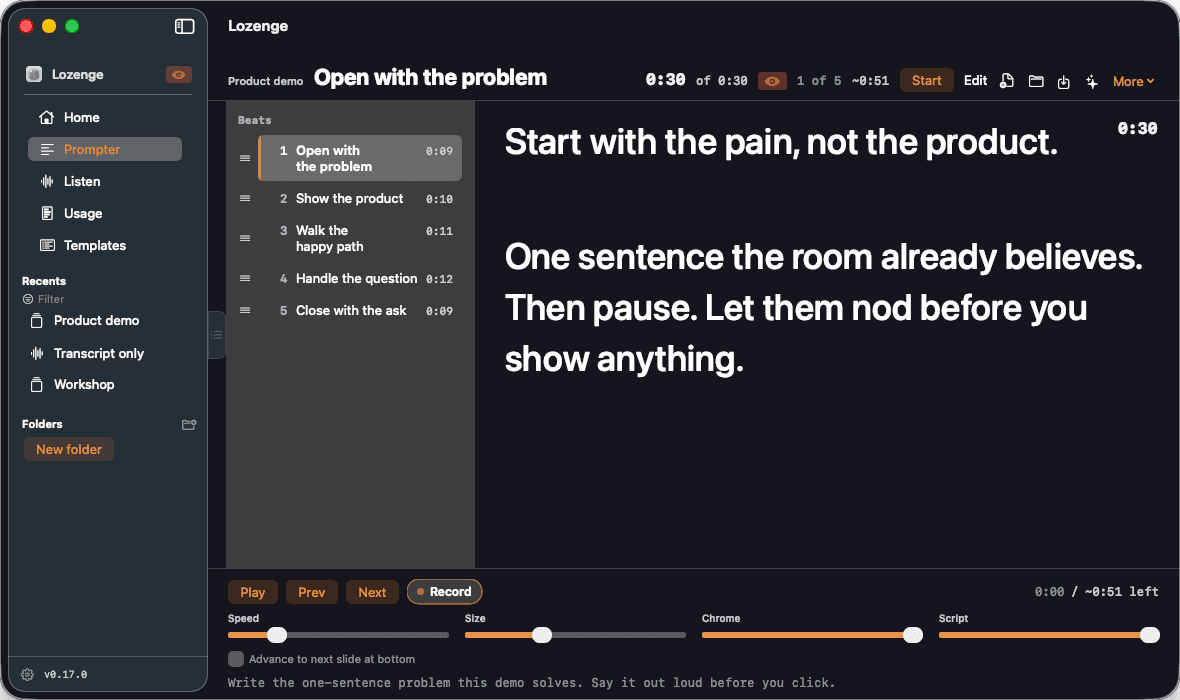
Lozenge started as a prompter for live demos and went through four names before one stuck. The one thing that never changed was that the audience can't see the window.
A lot of my job right now is live demos. I share my whole screen, open an editor, and
talk through something while I build it in front of people. The demo part is fine.
The part I kept getting wrong was the talk track. I'd have a script in a notes window
or on a second monitor, and every time I looked over at it the room watched me look
away. When I put it on the main screen instead, it showed up in the share, which is
worse.
There are teleprompter apps for the Mac. The ones I tried either scrolled at a speed
I had to guess, or they sat in a normal window that a full-desktop share picked up
like anything else. I wanted the words right under my camera, moving when I moved,
and invisible to Zoom.
The part that turned out to be easy
macOS already has the thing I needed most. An
NSWindow has a sharingType, and if
you set it to none the window server leaves it out of screen capture. Zoom, Meet and a
Slack huddle all capture the desktop the same way, so one property covers all three.
The first version of the app was mostly that property and a scrolling text view.What took longer was making sure it applied to every window, not just the main one.
An Open panel that pops up mid-talk is still a window. So is an alert, the Settings
sheet, a QR code for the phone remote. Each of those needed the same treatment, and
now there's a list in the docs of every window the app opens and a note that you
should still check it yourself once. Share your screen, join the call from your phone,
and look. I didn't trust it until I'd done that, and I wrote the thing.
Following my voice instead of a clock
The scroll speed problem was the one I cared about. A teleprompter that scrolls at a
fixed rate is fine for a newsreader and useless for a demo, because in a demo I stop
talking for twenty seconds while something builds, and then I talk fast to catch up.
So the script is split into beats, and Listening Sync listens to the mic and matches
what I say against the current beat. When I get to the end of it, it moves. It needs a
strong match plus a short pause before it advances. Without that it either sat there
when I paraphrased, or it jumped ahead when I stopped to breathe, and I went back and
forth on the numbers for a while before it felt right. Saying "next slide" moves it
too, and if a Google Slides deck is paired through the Chrome extension, the deck
moves with it.
The notch prompter came out of the same itch. It hangs a strip of the current beat
from the top of the screen, about a finger's width from the camera, so when I read it
I'm looking roughly at the lens.
Four names
The first name on the repo was a long, literal one about demo teleprompting, which
tells you exactly how narrow the idea was. Then it was
grokprompter, then Demo
Prompter, and finally Lozenge. That last one stuck because of what happened in
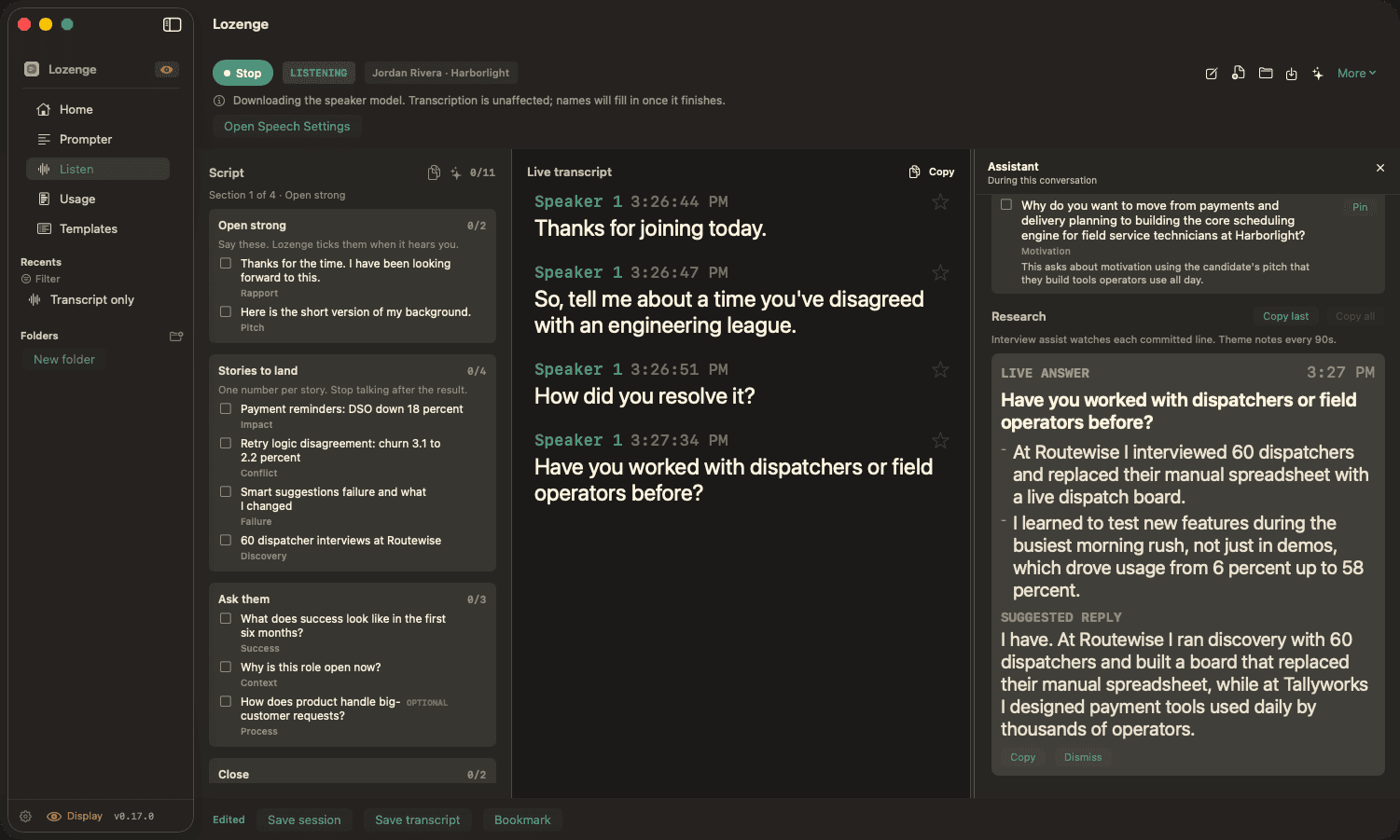
between.Once the prompter worked, I noticed the other half of my calls. In a lot of meetings
I'm not presenting, I'm listening, and what I want then is a transcript, a nudge when
someone asks something I should know the answer to, and notes I don't have to write
afterward. Same Mac, same hour, often the same meeting. So Listen got added next to
the Prompter: a live transcript with speaker labels, and a card that shows up when a
question lands, with talking points drawn from a folder of my own docs.
After that it wasn't a demo tool anymore. Templates for a recruiting interview, a 1:1,
a discovery call, a postmortem. An interview template that writes your questions from
the job description and resume you attach. A wrap-up brief when the call ends. The
people who'd use that are recruiters and managers, not just someone doing a product
walkthrough, so the name had to stop saying "demo." A lozenge is what you take before
you have to talk. I've been told not to explain that in the marketing copy, so I'm
explaining it here instead.
Keeping it on the Mac
A tool that listens to your calls and reads your job descriptions should not be
shipping any of that to a server I run, so there isn't one. There's no account.
Transcription runs on the Mac by default, with Apple's on-device speech engine on
macOS 26 and Whisper before that. The model calls for research and wrap-ups go to
whatever provider you set up with your own key, or to Ollama running locally, and the
keys sit in the Keychain.
A few rules came out of that and got pinned with tests so I couldn't quietly break
them later. The app opens at rest, and nothing listens until you press Start. A
template field marked Never send doesn't reach a model by any route. A follow-up email
opens as a draft in your mail app, and a Slack update doesn't post until you press
Post. There's a Usage page that shows what each model has cost, because I got tired of
guessing.
Lozenge is at lozenge.ai. It's macOS 14 and up, free while it's
in early release, and the details on everything above are on the
project page.