
October 11, 2026 · Michael Lynn
Fiscal Quarter: The Quarter in Your Menu Bar
I do work that's measured by the fiscal quarter, and I built this Mac menu bar app to always know where we are in the quarter and the year. It has desktop widgets and an iPhone app, and it's open source.
Fiscal Quarter: The Quarter in Your Menu Bar
Site: fq.mlynn.dev · Download: version 1.4 for Mac · Platform: macOS 13 and later, widgets on macOS 14 · Status: free and open source
Most of my work has been measured by the quarter. Targets come from a plan for the fiscal year, and a quarter that looks fine in week three can be in trouble by week nine, so I need to know at a glance where we are: which quarter it is, how many days are left in it, and how much of the year is already gone.
That has always been harder than it should be, because the fiscal year often doesn't match the calendar. At SpaceXAI it does, and the quarters are the ones on the wall calendar. MongoDB's fiscal year starts on February 1, so the Q1 everyone reported against began a month after the Q1 on my phone, and every customer and partner had their own version again. Before a forecast call I'd find myself counting weeks on my fingers to work out how much runway was left.
I built the first version of this while I was at MongoDB: a menu bar item that showed the quarter and the days left in it. Since then I've added countdowns, other companies' calendars, desktop widgets and an iPhone app, and packaged it up as open source.
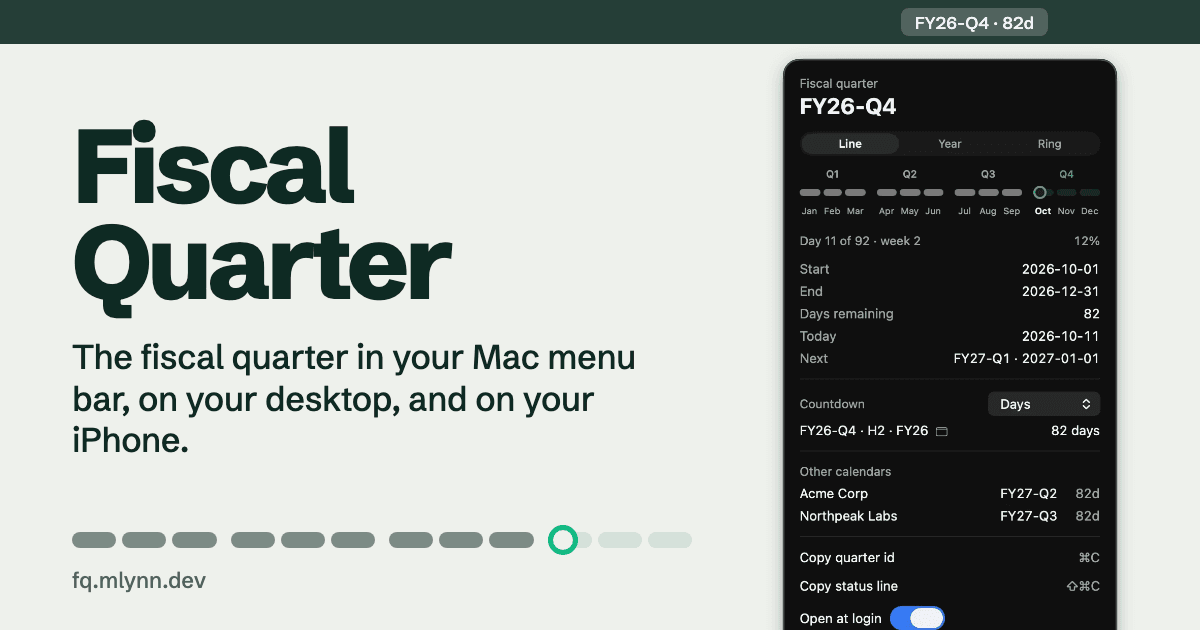
Fiscal Quarter puts the quarter in the menu bar. As I write this mine reads
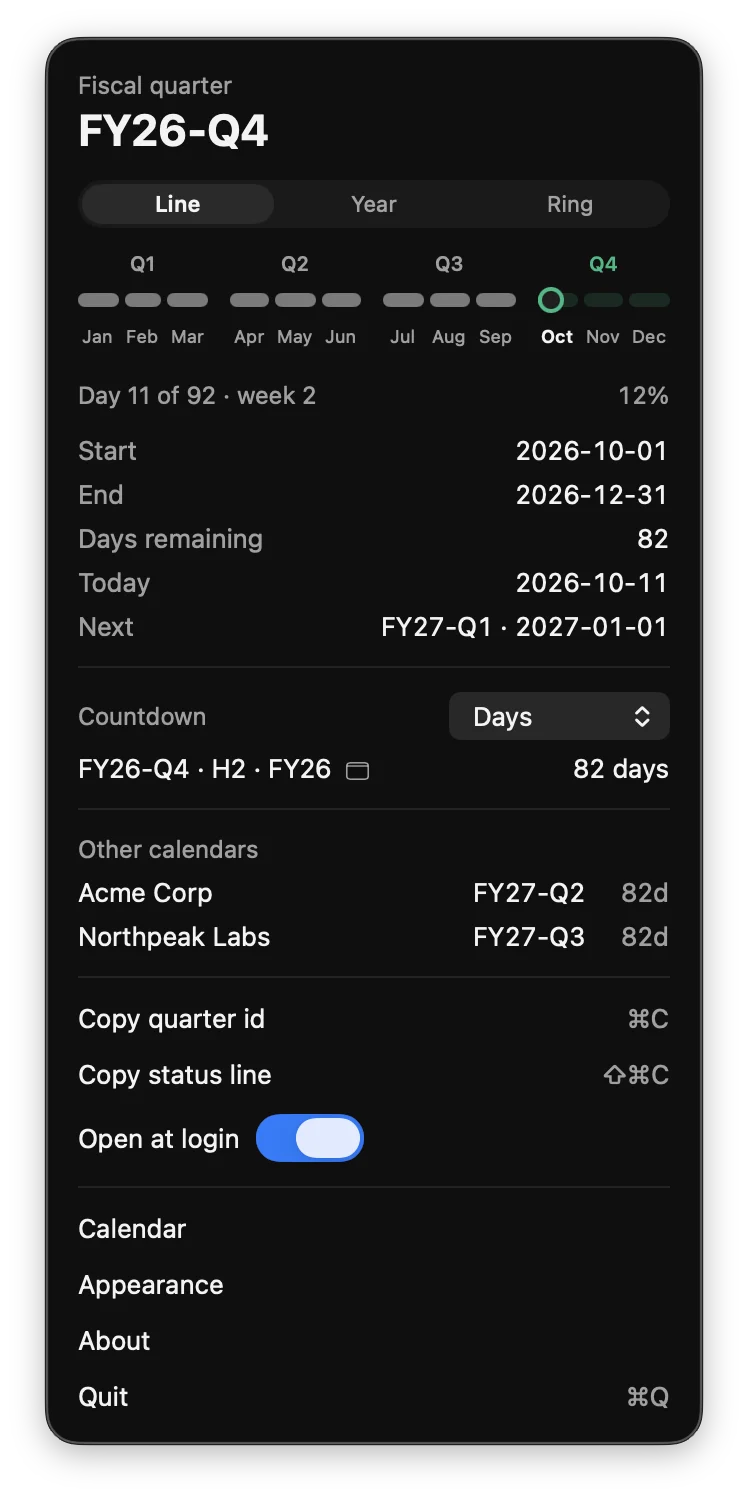
FY26-Q4 · 82d, which is the quarter and the days left in it, counting today. Click it and a panel drops down with the start and end dates, where you are (day 11 of 92, week 2), the year drawn as a line of months with a ring on today, and when the next quarter starts.Fiscal Quarter on the Mac and iPhone
1 / 6
Counting down
The panel counts down to the end of the quarter, the half, and the fiscal year. In October all three end on December 31, so they collapse into one line that reads
FY26-Q4 · H2 · FY26 with 82 days next to it. In May they split into two lines, because the half ends in June and the year doesn't.Days aren't always the right unit. You can switch to workdays, which today is 59, or weeks, or the number of weekends left. Workdays means Monday through Friday. It doesn't know about your holidays, and I'd rather it say so than guess. Click any countdown and it replaces the default one in the menu bar.
Other people's calendars
This is the part that came straight out of working at MongoDB, where my own fiscal year was rarely the one my customers used. You can add theirs by name and the day their year starts. On the same day, a company whose year starts in July is in FY27-Q2 and one starting in April is in FY27-Q3, and the panel lists both next to your own with the days left in each. A row turns amber in that company's last two weeks.
Calendars can also come from a JSON file, for the ones that don't fit "four quarters of three months." The built-in calendar used to be one of those. It had an 11-month FY27 that ran February through December before the year switched to January, and that definition still sits in the repo as
calendars/february-transition.json.Widgets
There are small and medium widgets for the Mac desktop and the iPhone Home Screen, and three Lock Screen sizes on iPhone. The medium one puts the quarter, the half and the year side by side with their own progress bars, since they started on different days even when they end on the same one.
Each widget can follow your calendar or one of the saved ones, and its label fills in with that calendar's name. On the Mac, desktop widgets go monochrome whenever an app is in front of them, which is worth knowing before you decide the green bars are broken.
Appearance
The look is shared by the app and every widget. You pick a background (the system's own, a color, one of six gradients, or a photo), a typeface out of ten, the weight of the big number, a text size, and an accent color. A photo gets copied into the app and scaled down, because widgets can't read your photo library, and the text over it gets a soft shadow so the labels stay readable over the bright parts.
In a shell
The app carries a command called
fq that reads the same calendars, for scripts and status lines.code-highlight$ fq --countdown
FY26-Q4 · H2 · FY26 ends 2026-12-31
82 days · 59 workdays · 12 weekends
fq --all prints your calendar and every saved one, and fq --json gives you all of it as one object.How it's built
It's Swift and SwiftUI, with WidgetKit for the widgets and App Intents for their settings. The menu bar app, both widgets and
fq share one core, and in that core a calendar is data rather than code: a list of eras, each either repeating a rule or listing its quarters outright. That's why a short transition year and a customer whose year starts in July turned out to be the same feature. Settings move between the app and its widgets through an App Group.The Mac build is signed and notarized, so it opens like any other app. There's no account, and it doesn't talk to the network.